The need
Mistakes stay in a notebook. The page stays silent. The student rereads without seeing the thread. The parent asks “where are they?” and nobody can show the page.
Al-Muṣḥaf is not another Qur'an reader. It is the follow-up thread: what the teacher heard in recitation lands on the page — word, verse, a place to revisit — without covering the Book, without judging faith.
Al-Muṣḥaf
The idea
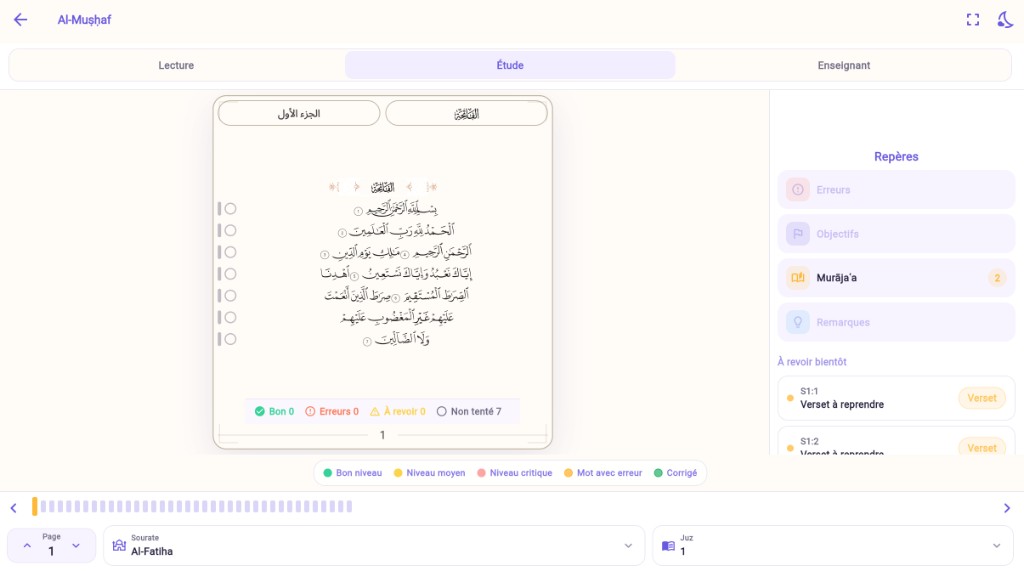
The student opens their Muṣḥaf. They see where it catches, where it holds, what the teacher marked — gently, never as an aggressive red alert. The parent can look. The teacher accompanies. The page stays a real Muṣḥaf; Darajet's intelligence lives around it, and comes alive on tap.
Mistakes stay in a notebook. The page stays silent. The student rereads without seeing the thread. The parent asks “where are they?” and nobody can show the page.
A personal, interactive Muṣḥaf: recitation traces project onto words and verses. Tap → pedagogical sheet (recitations, to revisit, review, goal). Reading / Study modes. Student, parent, teacher — one Book, different views.
« Where exactly did they hesitate? »
The word or verse carries a discreet mark. You see the place before opening a list. Tap opens the detail — not the other way around.
« How does the parent follow without entering the circle? »
Family space: the child's Muṣḥaf, read-only. The same marks, a reassuring tone. No account for the minor — the parent sees the page.
« Does the page stay a real Muṣḥaf? »
Yes. Glyphs and edition stay intact. The Book is not recolored. Motion and marks live as an overlay — read first, study second.
Follow-up on the page — not only in a list
The same Muṣḥaf for student, parent and teacher
Animated, tactile, never shaming
Keep exploring
Try it now
The screenshots are the real interface. Open the app directly, or let's take a moment together to walk through it.